
Built by contractors, for contractors
The most powerful document management tool for construction.
Upload, manage and collaborate on your documents, all in one place. Drawli keeps your team working from the same set, whether you're on site or in the office.


Trusted by contractors of every size,
from sole traders to multi-site teams.
How Drawli works for you

Add anyone to a project in seconds, no lengthy setup. Assign a role and they're straight in, seeing exactly what they need.

Flexible Views
Switch between timeline, tile or list view, whichever suits the job. Same documents, just the view that works for you.

Upload a document and let AI fill in the details for you. No more manual data entry for every drawing you add.

Revision Control
Every document tracked, so you're always working from the latest revision. Colour-coded status' makes it easy at a glance.

Comment directly on the drawing with your team, right where it matters. No more separate email threads to keep track of.

Narrow down your search by document type, location and more, so the right file is always a few clicks away.

Connect drawings, specs and photos that relate to each other. Everything stays linked, nothing gets lost.

Set your scale from a reference measurement, or enter it directly. Accurate measurements, right on the drawing.
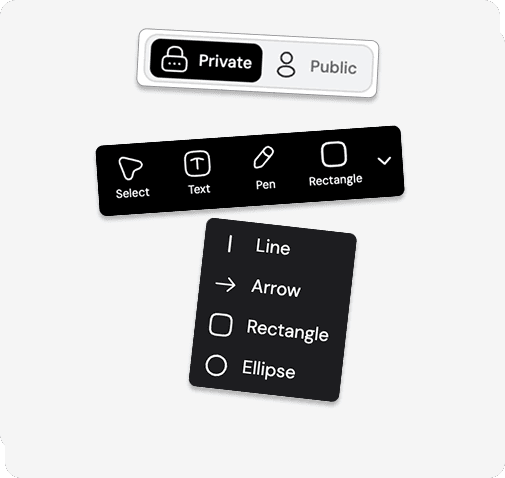
Markup Tools
Add markups straight onto the drawing with our full toolkit, right where you need them. Keep them private or share with the team.
Three views, one Drawli
One set of documents. Three ways to see them.




Drawli Features
The new standard for onsite document management.
Drawli is built to grow with you, whatever the size of your team. From simple jobs to complex, multi-trade projects, it adapts to how you work and keeps everyone moving from the same set of documents. Start using Drawli today and see how it transforms the way you manage, collaborate, and deliver.
Cloud Storage
Every document and revision in one place. No more searching inboxes, folders or messages.
Multiple Views
Three versatile ways to view your plans and documents; Timeline, Tile and List.
Markup Drawings
Markup your documents privately or share them with the team, using a wide range of tools.
Compatable
Compatible with a full range of construction document types out of the box.